
GEPCO Bill Check by CNIC: What Really Works
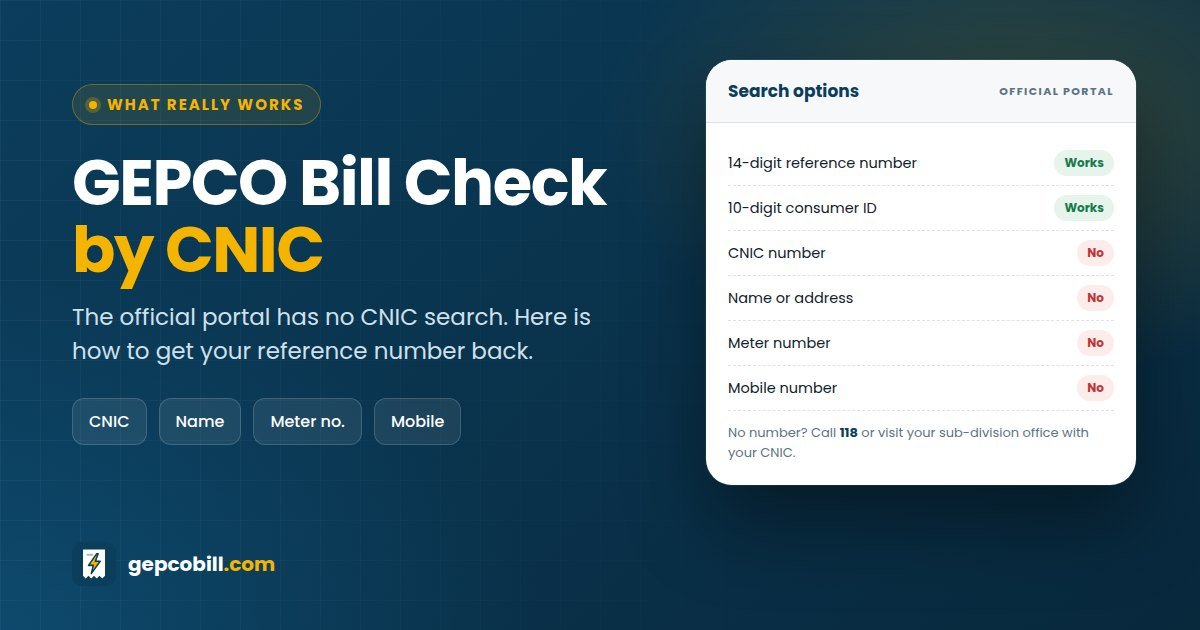
Many people try a GEPCO bill check by CNIC because they have lost their paper bill. The honest answer is that the official PITC portal cannot find a bill by CNIC, name, meter or mobile number. It searches only by the 14-digit reference number or the 10-digit consumer ID.
The good news is that you can get your reference number back quickly, often in minutes. This guide shows you every option, starting with the fastest.
On this page
- Can You Do a GEPCO Bill Check by CNIC?
- Why There Is No GEPCO Bill Check by CNIC Online
- How a GEPCO Bill Check by CNIC Works Offline
- GEPCO Bill Check by Name or Address
- GEPCO Bill Check by Meter Number
- GEPCO Bill Check by Mobile Number or SMS
- Are GEPCO Bill Check by CNIC Websites Safe?
- Recover Your Reference Number in Four Steps
- Frequently Asked Questions About GEPCO Bill Check by CNIC
- The Fastest Way Forward
- More GEPCO Guides
Can You Do a GEPCO Bill Check by CNIC?
No, not online. Here is how every search method compares, so you can move straight to one that works.
| Search method | Works online? | What to do instead |
|---|---|---|
| 14-digit reference number | ✓ Yes | Enter it in the checker above |
| 10-digit consumer ID | ✓ Yes | Switch to the Customer ID tab |
| CNIC or ID card number | ✕ No | Call 118 or visit your sub-division office with your CNIC |
| Name or father’s name | ✕ No | Ask the office to search by your full address |
| Address | ✕ No | Visit the office; staff can search records by address |
| Meter number | ✕ No | Photograph the meter and show it at the office |
| Mobile number | ✕ No | Check your wallet or banking app history for the reference number |
Why There Is No GEPCO Bill Check by CNIC Online
A GEPCO bill belongs to a connection at an address, not to a person. One CNIC can hold several connections, a tenant’s CNIC may not be on the bill at all, and many bills still carry the name of a previous owner.
Privacy matters too. If a CNIC search existed, anyone who knew your ID card number could see your address and bills. Therefore, PITC limits the online search to numbers printed on the bill itself.
How a GEPCO Bill Check by CNIC Works Offline
Your CNIC is still useful, just not online. Use it with one of these official channels to recover the number.
Call the 118 helpline
The 118 contact centre handles GEPCO consumers and is free to call. Give the name on the connection, the full address and your CNIC, then ask for help finding your reference number. Staff may send you to your sub-division office if they need to verify ownership.
Visit your GEPCO sub-division office
Take your original CNIC, the full address and, if possible, a neighbour’s bill. Staff can search the records by address and give you the reference number or a printed duplicate bill on the spot.
Register your CNIC and mobile with GEPCO
GEPCO’s website has a Registration for CNIC/Mobile Number page. It is a registration form for your details, not a bill search. Even so, keeping your CNIC and mobile up to date helps GEPCO contact you and can matter for tax deductions on your bill.
GEPCO Bill Check by Name or Address
The portal cannot search by name either. That is a good thing, since names repeat and many bills still show the original owner rather than the person living there now.
Your address works only in person. At the sub-division office, give the house number, street, area and nearest landmark, and staff can find your account.
GEPCO Bill Check by Meter Number
You will find your meter number on the meter and on the bill, but the online portal does not accept it. Instead, take a clear photo of the meter showing its serial number and reading.
Then show that photo at your sub-division office. It is the fastest way for staff to match the meter to your reference number, especially in a building with several meters.
GEPCO Bill Check by Mobile Number or SMS
There is no official way to check a GEPCO bill by mobile number. However, your phone may already hold the reference number in another place.
- Wallet and banking apps: open the saved billers or payment history in JazzCash, Easypaisa or your bank app.
- SMS and WhatsApp: search your messages for “GEPCO” or “electricity”, since payment confirmations often include the number.
- SMS 8118: this is PITC’s official number for complaints, printed on GEPCO bills. It is not a bill-check service.
Some websites share SMS formats for getting a bill by text message. We could not confirm any of them as official, so we do not recommend relying on them.
Are GEPCO Bill Check by CNIC Websites Safe?
Be careful. A website that promises a GEPCO bill check by CNIC cannot reach official records that way, because the official system has no CNIC search. At best it guesses; at worst it collects ID card numbers.
- The site asks for your CNIC, mobile number or bank details
- It promises results that the official portal cannot give
- It asks for a fee to “find” your bill
- It pushes you to pay a bill through an unknown link
If you see any of these signs, close the page and use one of the official channels above.
Recover Your Reference Number in Four Steps
Once you have it, save it with the consumer ID in your phone notes. Our GEPCO reference number guide shows exactly where both numbers appear on the bill.
Frequently Asked Questions About GEPCO Bill Check by CNIC
01Can I do a GEPCO bill check by CNIC online?
No. The official PITC portal searches only by the 14-digit reference number or the 10-digit consumer ID. Use your CNIC with the 118 helpline or at your sub-division office to get your reference number instead.
02Is a GEPCO bill check by CNIC the same as by ID card number?
Yes. An ID card number is your CNIC, so the answer is the same: it does not work online. Staff at your sub-division office can still use your ID card to help locate your connection.
03Can I check my GEPCO bill by name?
No. The portal has no name search, and many bills still show a previous owner’s name. The office can search by your full address instead.
04Can I check my GEPCO bill by meter number?
Not online. Photograph your meter’s serial number and reading, and take the photo to your sub-division office to find your reference number.
05Can I check my GEPCO bill by mobile number?
No official service does this. Look in your wallet or banking app history instead, because past electricity payments list the reference number.
06How can I check my GEPCO bill without a reference number?
Use the 10-digit consumer ID from the same bill, since it opens the same bill online. If you have neither number, recover the reference number through 118 or your sub-division office.
07What is SMS 8118 for?
It is PITC’s official SMS number for electricity complaints, printed on GEPCO bills. For bill checks, use the reference number online instead.
08Is it safe to enter my CNIC on bill check websites?
Avoid it. Genuine bill checkers do not need your CNIC, so a site that asks for it may be collecting personal data. Use only a reference number or consumer ID.
The Fastest Way Forward
A GEPCO bill check by CNIC is not possible online, but recovering your reference number usually takes one phone search or one call. After that, the checker at the top of this page opens your bill in seconds.
More GEPCO Guides
Disclaimer: GEPCOBill.com is an independent information service. It is not affiliated with Gujranwala Electric Power Company (GEPCO), Power Information Technology Company (PITC), WAPDA or NEPRA. Rules, rates and contact details can change; your printed bill and official notices are final.
Last reviewed: 29 September 2026 by the GEPCOBill editorial team.