
GEPCO Online Bill Check & Duplicate Bill
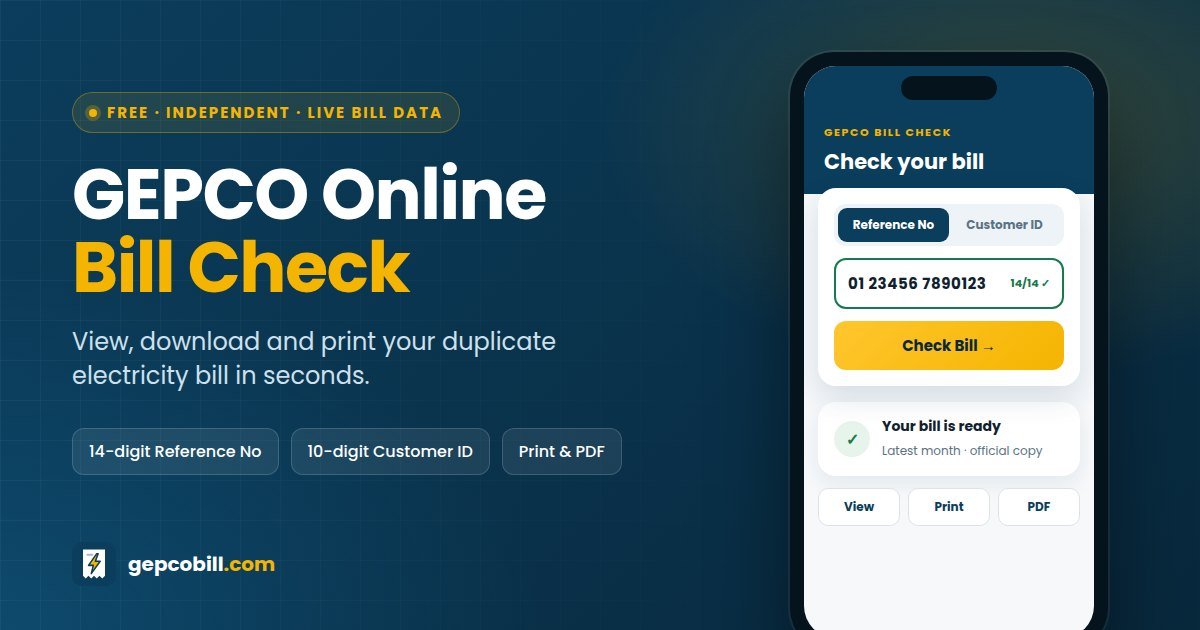
Use this free GEPCO online bill check to see your latest electricity bill in seconds. Enter the 14-digit reference number or the 10-digit customer ID from any old bill, and the official copy opens right away, ready to view, download or print.
It works for every Gujranwala Electric Power Company connection in Gujranwala, Sialkot, Gujrat, Hafizabad, Narowal, Mandi Bahauddin and Wazirabad. Because the bill comes live from the official PITC billing system, the amount, due date and units match the paper copy delivered to your home.
Updated for November 2026 bills. Free to use, no sign-up needed, and your number is never sold or shared.
On this page
- How to Check Your GEPCO Bill Online in 3 Steps
- Where to Find Your GEPCO Reference Number and Customer ID
- What Your GEPCO Duplicate Bill Shows
- How Your GEPCO Bill Is Calculated
- Protected vs Unprotected Consumers: Why 200 Units Matter
- Check Old GEPCO Bills and Payment Status Online
- Can You Check a GEPCO Bill Online by CNIC, Name or Meter Number?
- How to Pay Your GEPCO Bill Online
- GEPCO Bill Due Date and Late Payment
- Common Problems When You Check a GEPCO Bill Online
- Areas Served by GEPCO
- GEPCO Helpline, Offices and Complaints
- GEPCO Bill Online Check in Urdu
- More GEPCO Guides
- Why Use GEPCOBill.com?
- Frequently Asked Questions About GEPCO Online Bill Check
- Check Your GEPCO Bill Online Now
How to Check Your GEPCO Bill Online in 3 Steps
You can check your GEPCO bill online in under a minute once you have your number. Here is the whole process, from start to finish.
Sometimes the PITC portal slows down, especially in the first days of a billing cycle. In that case, wait a minute and try the GEPCO online bill check again. Also, bookmark this page so next month takes a single tap.
Check your GEPCO bill online by customer ID
Your customer ID is a shorter, 10-digit number printed near the reference number. It points to the same connection, so it opens the same bill. That makes it a handy backup when the reference number on an old or faded bill is hard to read.
Where to Find Your GEPCO Reference Number and Customer ID
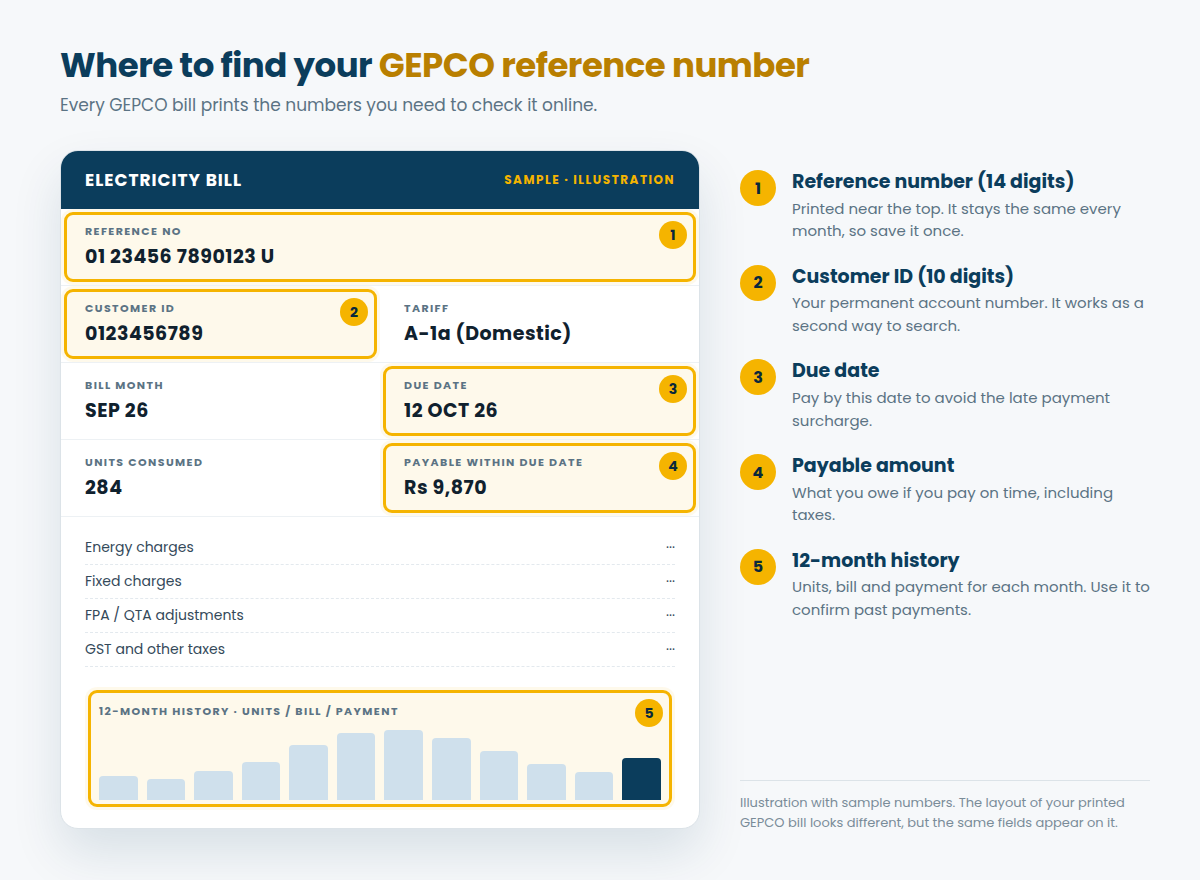
Both numbers sit in the top section of every GEPCO bill. The reference number usually appears in groups of digits followed by a letter: U for urban or R for rural. You only need the 14 digits, so leave the letter out.
| Detail | Reference Number | Customer ID |
|---|---|---|
| Length | 14 digits | 10 digits |
| Where it appears | Top section, labelled “Reference No” | Beside the reference number, labelled “Customer ID” |
| Changes every month? | No, it stays with your connection | No, it is your permanent account number |
| Works in our checker | ✓ Yes | ✓ Yes |
| Best used for | Online checks and most bank or wallet payments | A backup when the reference number is unclear |
The reference number stays the same month after month unless GEPCO moves your connection to a different batch or sub-division. So save it once in your phone notes, and you will never need to dig out an old bill again.
Lost your bill? Other ways to get your reference number
- Search your phone for an old photo, screenshot or PDF of the bill, since every copy shows the number.
- Open the payment history in JazzCash, Easypaisa or your banking app, where past electricity payments list the reference number.
- Ask your landlord for it if you rent the property.
- Call the GEPCO helpline on 118, or visit your sub-division office with your CNIC.
Once you have it, come back and run the GEPCO online bill check again. For more detail, read our full guide to the GEPCO reference number.
What Your GEPCO Duplicate Bill Shows
A duplicate bill is a complete copy of the original, not a summary. Therefore, you can use it exactly like the paper bill that arrives at your door.
| Section | What it tells you | Why it matters |
|---|---|---|
| Consumer details | Name, address, tariff and sanctioned load | Confirms the bill belongs to your connection |
| Billing dates | Reading date, issue date and due date | Tells you exactly when to pay |
| Meter readings | Previous and present reading, and units consumed | Lets you verify the units you are charged for |
| Charges | Energy charges, fixed charges, adjustments and taxes | Shows how the total was worked out |
| Arrears | Any unpaid balance from earlier months | Explains a higher-than-expected amount |
| Payable amounts | Amount within the due date and after it | Gives the exact figure to pay |
| 12-month history | Units, bill amount and payment for each month | Proves past payments and shows seasonal use |
What you can do with your duplicate bill
- View it on any phone, tablet or computer
- Print it for a bank counter or an office visit
- Save it as a PDF for your records or tax file
- Check the due date and payable amount before you pay
- Confirm last month’s payment in the history table
For a line-by-line walkthrough with a labelled bill, see our guide on how to read a GEPCO bill.
How Your GEPCO Bill Is Calculated
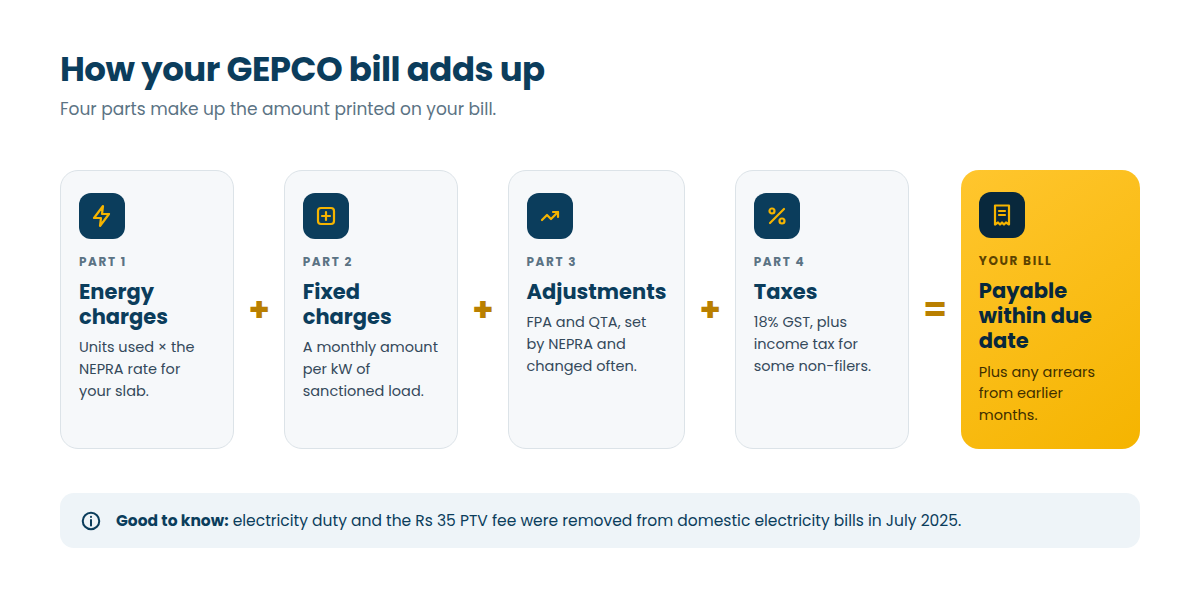
Most people only look at the final amount. However, the four parts behind it explain why two similar homes can pay very different bills, and they help you spot mistakes early.
| Charge | What it is | How often it changes |
|---|---|---|
| Energy charges | Units consumed multiplied by the NEPRA rate for your slab | When NEPRA revises the base tariff |
| Fixed charges | A monthly amount per kW of sanctioned load, approved by NEPRA in February 2026 for most domestic users (lifeline users are exempt) | With tariff revisions |
| FPA | Fuel price adjustment: the difference between estimated and actual fuel costs of an earlier month | Almost every month |
| QTA | Quarterly tariff adjustment set by NEPRA | Every quarter |
| GST | 18% general sales tax on the electricity charges | Through the federal budget |
| Income tax | Withheld from some non-filers with large bills | Through the federal budget |
| Arrears and surcharge | Unpaid past amounts, plus the late payment surcharge | Only when a bill is paid late |
Want an estimate before the bill arrives? Try the GEPCO bill calculator, or compare current slab rates on the GEPCO unit price page.
Protected vs Unprotected Consumers: Why 200 Units Matter
Your slab rate depends on whether GEPCO bills you as a protected or an unprotected domestic consumer. Protected status applies when you use 200 units or less in each of the previous six months.
However, crossing 200 units even once moves you to unprotected rates for that month and the next five. As a result, one hot month with heavy air-conditioner use can raise your bills for half a year. A proposal to shorten this penalty is under discussion, but the six-month rule still applies until the government notifies a change.
Simple ways to stay under 200 units
- Watch the units in your bill’s history table, especially from May to September
- Set the air conditioner to 26°C and use its timer at night
- Replace old bulbs with LED lights and old ceiling fans with inverter or DC fans
- Switch off water pumps, geysers and chargers when you are not using them
Check Old GEPCO Bills and Payment Status Online
Every GEPCO bill includes a 12-month history table. Consequently, a single duplicate bill shows the units, amount and payment for the past year, which is usually all you need to track older bills.
Can I check a previous month’s GEPCO bill online?
The official portal shows your most recent bill. For earlier months, use the history table on that bill, or save a PDF each month after you check it here. If you need a full copy of an older bill, for example for a property sale, your sub-division office can usually provide one.
Check online whether your GEPCO bill is paid
Open next month’s bill with the GEPCO online bill check and look at the payment column in the history table. Your payment should appear against the month you paid. Until then, keep the receipt or transaction ID from your bank, JazzCash or Easypaisa.
Payments can take a few days to reach GEPCO’s records. If the payment still does not show after the next bill is issued, take your receipt to the sub-division office. Our guide on checking whether a GEPCO bill is paid covers each case.
Can You Check a GEPCO Bill Online by CNIC, Name or Meter Number?
Not online. The PITC billing portal searches only by reference number or customer ID, so every genuine checker, including this one, needs one of those two numbers.
| Search method | Works online? | What to do instead |
|---|---|---|
| 14-digit reference number | ✓ Yes | Enter it in the checker above |
| 10-digit customer ID | ✓ Yes | Switch to Customer ID and enter it |
| CNIC number | ✕ No | Call 118 or visit your sub-division office with your CNIC to get your reference number |
| Name or address | ✕ No | Visit the office; staff can search records by address |
| Meter number | ✕ No | Photograph the meter and take the photo to your sub-division office |
| Mobile number | ✕ No | Look up old payments in your wallet or banking app instead |
Our guide to GEPCO bill check by CNIC explains every option step by step.
How to Pay Your GEPCO Bill Online
Once you know the amount, paying online takes only a couple of minutes. Every option below asks for the same 14-digit reference number that you used for the check.
| Payment option | How it works | Good for |
|---|---|---|
| JazzCash app | Bill payments → Electricity → GEPCO, then enter the reference number | Quick mobile payments |
| Easypaisa app | Bill payment → Electricity → GEPCO, then enter the reference number | Paying from any mobile network |
| Banking app or internet banking | Utility bill payments → Electricity → GEPCO | Paying straight from a bank account |
| Bank branch or ATM | Pay at the counter with your bill, or use the ATM bill-payment menu | Cash payments |
| From abroad | Use a Pakistani bank app or wallet you already hold, or ask family in Pakistan to pay with the reference number | Overseas Pakistanis in the Gulf, UK and elsewhere |
Menu names differ slightly between apps. Either way, keep the receipt or a screenshot until the payment shows on your next bill.
GEPCO Bill Due Date and Late Payment
The due date sits next to the payable amount on your bill. If you pay by that date, you pay the lower “within due date” figure.
After the due date, GEPCO adds a late payment surcharge, and the higher “after due date” amount applies. Moreover, anything left unpaid carries over as arrears on the next bill, and connections with long-unpaid bills can be disconnected.
Need more time or an installment plan?
If a bill is too large to pay at once, visit your sub-division office before the due date and ask about installments or an extension. Take your CNIC and the latest bill with you. Since approval is at GEPCO’s discretion, apply early rather than on the last day.
Common Problems When You Check a GEPCO Bill Online
Most errors come from a mistyped number or a busy portal. Find your issue below and try the fix before you contact GEPCO.
| Problem | Likely cause | Fix |
|---|---|---|
| “Bill not found” | A missing or wrong digit, or the wrong search tab | Recount the digits (14 or 10) and pick the matching tab |
| Bill takes long to load | Heavy traffic on the PITC portal, often at the start of the month | Wait a minute and try again, or try later in the day |
| Last month’s bill appears | The new bill has not been issued for your batch yet | Check again in a day or two |
| Blank or cut-off bill | An outdated browser or a blocked script | Update your browser or switch to Chrome, then reload |
| Printout has extra pages | Browser print margins | Choose “Save as PDF” and set margins to Default or None |
| Wrong name, tariff or reading | A record or meter-reading error | Register a complaint through 118 or your sub-division office |
Still stuck? Open the official PITC GEPCO web bill directly. If it fails there too, the problem is on the portal’s side, and waiting is the only fix. For billing errors, our GEPCO complaint guide explains how to get them corrected.
Areas Served by GEPCO
Gujranwala Electric Power Company was formed in 1998 and supplies electricity across seven districts of north-eastern Punjab. So if your bill carries the GEPCO name, the checker on this page works for it.
| District | Major towns |
|---|---|
| Gujranwala | Gujranwala city, Kamoke, Nowshera Virkan |
| Wazirabad | Wazirabad, Alipur Chatha |
| Sialkot | Sialkot city, Daska, Sambrial, Pasrur |
| Gujrat | Gujrat city, Kharian, Lalamusa, Sarai Alamgir |
| Hafizabad | Hafizabad city, Pindi Bhattian |
| Narowal | Narowal city, Shakargarh, Zafarwal |
| Mandi Bahauddin | Mandi Bahauddin city, Phalia, Malakwal |
GEPCO Helpline, Offices and Complaints
For faults, outages and billing errors, call the GEPCO helpline on 118. Alternatively, visit your sub-division office; its address and phone number are printed on your bill.
GEPCO’s head office is at 565-A, Model Town, G.T. Road, Gujranwala. If your complaint is not resolved, you can escalate it to NEPRA, the national power regulator. Our GEPCO helpline page lists circle and division contacts.
GEPCO Bill Online Check in Urdu
گیپکو بل آن لائن چیک کرنے کا طریقہ
- اپنے کسی بھی پرانے بجلی کے بل کے اوپر لکھا ہوا 14 ہندسوں کا ریفرنس نمبر تلاش کریں۔
- اوپر دیے گئے باکس میں ریفرنس نمبر یا 10 ہندسوں کی کسٹمر آئی ڈی درج کریں۔
- "Check Bill" کے بٹن پر کلک کریں، آپ کا ڈپلیکیٹ بل چند سیکنڈ میں کھل جائے گا۔
- بل کو پرنٹ کریں یا PDF میں محفوظ کریں، اور آخری تاریخ سے پہلے ادائیگی کریں۔
شکایت یا بجلی کی خرابی کے لیے گیپکو ہیلپ لائن 118 پر رابطہ کریں۔
More GEPCO Guides
Each guide below answers one question in depth, so you can go straight to the help you need.
Why Use GEPCOBill.com?
GEPCOBill.com is an independent website with one job: getting GEPCO customers to their bill quickly and helping them understand it. We are not GEPCO, PITC or WAPDA, and we never ask for payment.
- Live official data. The checker fetches your bill from the PITC billing system the moment you search.
- Private by design. We use your number only to fetch your bill, and the lookup expires automatically within an hour.
- Built for phones. No app and no sign-up; the checker works on any mobile browser.
- Reviewed every month. We check tariffs, taxes and adjustments against NEPRA and government notices each billing cycle.
Frequently Asked Questions About GEPCO Online Bill Check
01How can I check my GEPCO bill online?
Enter your 14-digit reference number or 10-digit customer ID in the checker at the top of this page, then press Check Bill. Your latest bill opens on the next page, straight from the official PITC system, and you can view, print or save it as a PDF.
02What is the reference number on a GEPCO bill?
It is the 14-digit number printed in the top section of your bill, often shown in groups with a U or R after it. It identifies your connection and stays the same every month, so you can reuse it for every online check and payment.
03Can I check my GEPCO bill online without the reference number?
Yes, if you have your 10-digit customer ID, which appears on the same bill. If you have neither number, look for an old photo of the bill, check your payment app history, or call 118 to get your reference number.
04Can I check my GEPCO bill online by CNIC?
No. The official PITC portal does not search by CNIC, name, mobile or meter number. Instead, take your CNIC to your sub-division office or call 118, and staff can give you the reference number for your connection.
05How do I download or print my GEPCO duplicate bill?
Open your bill with the checker, then press Print / Save PDF above the bill. Choose your printer, or pick “Save as PDF” as the destination to keep a digital copy on your phone or computer.
06Can I pay with a printed duplicate bill?
Yes. Banks and payment apps identify your bill by its reference number, so a printed duplicate works like the original at most counters. You can also skip the printout and pay in an app with just the number.
07How can I check my previous month’s GEPCO bill online?
Open your latest bill and look at the 12-month history table, which lists the units, bill amount and payment for each past month. For a complete copy of an older bill, ask your GEPCO sub-division office.
08How do I check online if my GEPCO bill is paid?
Run a GEPCO online bill check after your next bill is issued and look at the payment column in the history table. Your payment should appear against the right month. Until then, keep your bank or wallet receipt as proof.
09Why does the checker say “bill not found”?
Usually a digit is missing or the wrong tab is selected. Recount the digits, 14 for a reference number and 10 for a customer ID, and try again. If the number is correct, the PITC portal may be busy, so retry in a few minutes.
10When can I check the new GEPCO bill online?
GEPCO bills its connections in batches, so new bills appear on different dates in different areas. If your GEPCO online bill check still shows last month’s bill, your batch has not been billed yet. Check again in a day or two.
11Is GEPCOBill.com the official GEPCO website?
No. GEPCOBill.com is an independent service and is not affiliated with GEPCO, PITC or WAPDA. The bill you see comes directly from the official PITC system. For official notices, visit gepco.com.pk.
12Is it safe to enter my reference number here?
Yes. A reference number only opens the bill; nobody can use it to change your account or make payments. We use it to fetch your bill, and the lookup is deleted automatically within an hour.
13What is the GEPCO helpline number?
Dial 118 from any phone for power outages, faults and billing complaints. You can also call your sub-division office on the number printed on your bill.
Check Your GEPCO Bill Online Now
Your GEPCO bill is never more than a minute away. Keep your 14-digit reference number handy, run the GEPCO online bill check at the start of each billing cycle, and pay before the due date to avoid the surcharge.
Finally, bookmark this page so next month’s check takes one tap. And if anything on your bill looks wrong, our guides and the 118 helpline will point you to the fix.
Disclaimer: GEPCOBill.com is an independent information service. It is not affiliated with Gujranwala Electric Power Company (GEPCO), Power Information Technology Company (PITC), WAPDA or NEPRA. Bills are displayed from the official PITC portal. Tariff and tax details are for guidance only; your printed bill is final.
Last reviewed: 29 September 2026 by the GEPCOBill editorial team.