
GEPCO Reference Number: Where to Find It on Your Bill
Your GEPCO reference number is the 14-digit number printed near the top of every electricity bill. It identifies your connection, so you need it to check your bill online, pay it in an app, or register a complaint. Below you will see exactly where it sits, what the digits mean, and how to get it back if you lost your bill.
On this page
- What Is a GEPCO Reference Number?
- Where to Find the Reference Number on a GEPCO Bill
- What the 14 Digits of a GEPCO Reference Number Mean
- How to Check Your Bill by GEPCO Reference Number
- Lost Your Bill? How to Get Your GEPCO Reference Number Back
- Does the GEPCO Reference Number Ever Change?
- Is It Safe to Share the Number?
- Frequently Asked Questions About the GEPCO Reference Number
- Save the Number Once, Use It Every Month
- More GEPCO Guides
What Is a GEPCO Reference Number?
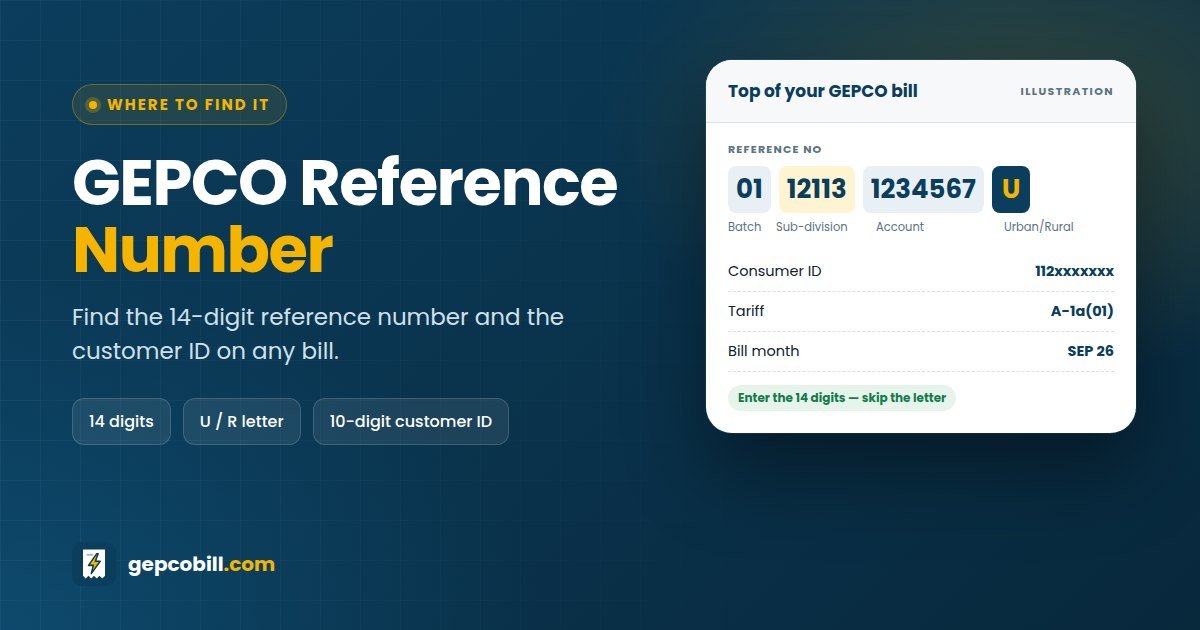
It is the account number of your electricity connection. On a GEPCO bill it usually appears in groups, such as 01 12113 1234567 U, with a letter at the end.
The number stays the same every month. Consequently, once you save it in your phone, you can check and pay every future bill without the paper copy.
Where to Find the Reference Number on a GEPCO Bill
Look at the top section of the bill, in the block with your tariff, load and bill month. You will see the label REFERENCE NO, and the 10-digit CONSUMER ID sits close to it.
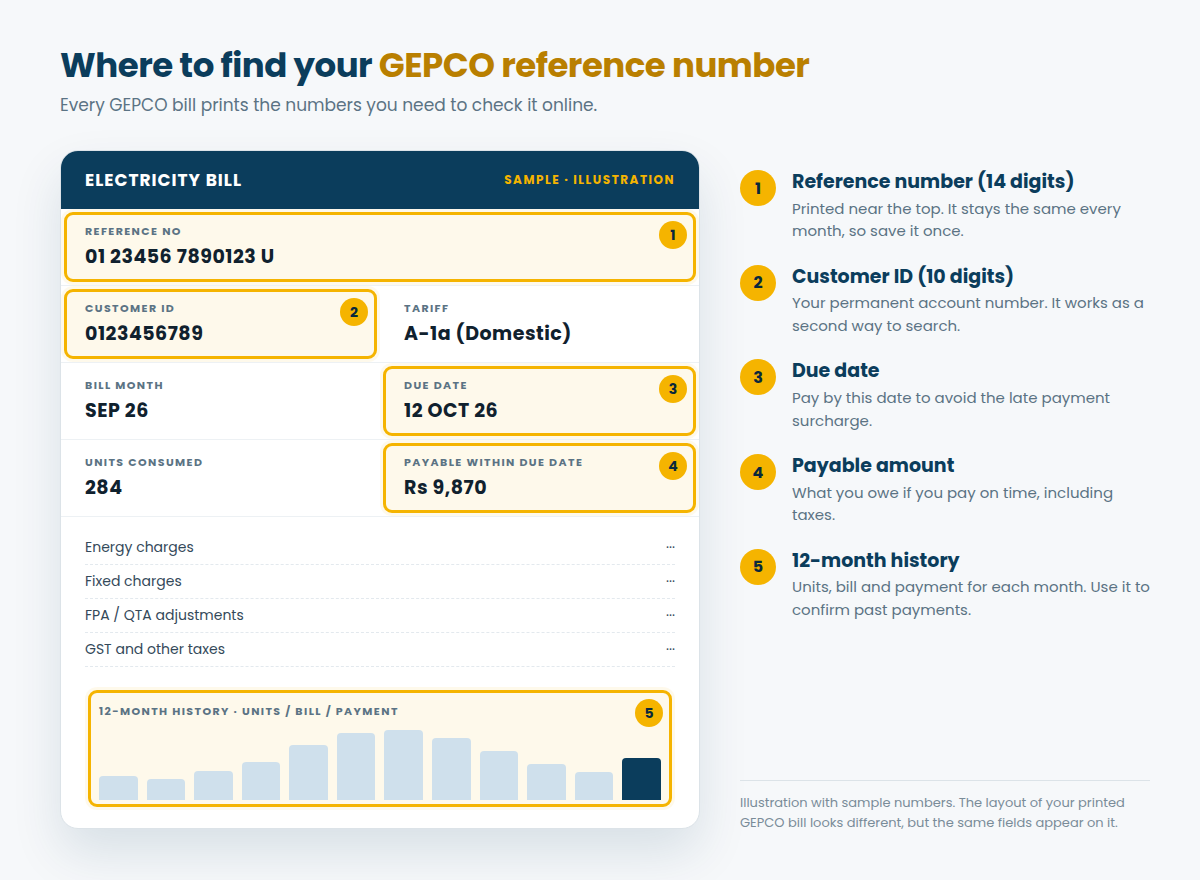
The layout of printed bills changes from time to time, and the Power Division announced a redesigned bill in 2026. Even so, the reference number always appears in the top part of the bill.
Reference number, consumer ID and other numbers compared
A GEPCO bill carries several long numbers, and mixing them up is the most common reason a search fails.
| Number on the bill | Length | What it is | Works in the online bill check? |
|---|---|---|---|
| REFERENCE NO | 14 digits + U or R | Your connection’s account number | ✓ Yes |
| CONSUMER ID | 10 digits (GEPCO IDs usually start with 112) | A second, permanent customer number | ✓ Yes |
| OLD A/C NUMBER | 14 digits | A number from the older billing records | ✕ No |
| METER NO | Varies | The serial number of your meter | ✕ No |
Our checker calls the consumer ID “Customer ID”. Both names mean the same 10-digit number.
What the 14 Digits of a GEPCO Reference Number Mean
The bill does not label the parts, but the number is commonly read in four blocks. Knowing them helps you spot a typing mistake quickly.
| Block | Digits | Example | What it usually stands for |
|---|---|---|---|
| 1 | 2 | 01 | Batch: the billing group your area belongs to |
| 2 | 5 | 12113 | Sub-division code (on GEPCO bills it starts with 12) |
| 3 | 7 | 1234567 | Your account within that sub-division |
| Letter | 1 | U or R | Urban or rural connection |
Here is a handy check. If the five-digit block does not start with 12, the bill probably belongs to another company, such as IESCO or FESCO, so the GEPCO portal will not find it.
How to type the number correctly
- Type all 14 digits in order, without the U or R at the end.
- Leave out spaces and dashes; our checker removes them anyway.
- Count the digits twice, because a missing zero at the start is a common mistake.
- If the bill is faded, compare it with an older photo or a payment receipt.
How to Check Your Bill by GEPCO Reference Number
Once you have the number, opening your bill takes seconds. Use the checker at the top of this page, our GEPCO online bill check page, or the official PITC GEPCO web bill.
If the reference number does not work, switch to the Customer ID tab and try the 10-digit consumer ID instead. Both open the same bill.
Lost Your Bill? How to Get Your GEPCO Reference Number Back
You do not need the paper bill to recover the number. Try these options, starting with the quickest.
| Where to look | What to do | How fast |
|---|---|---|
| Phone gallery, WhatsApp or email | Search for an old photo or PDF of any GEPCO bill | Minutes |
| Payment apps | Open the saved billers or payment history in JazzCash, Easypaisa or your banking app | Minutes |
| Old receipts | Bank-stamped bills and payment slips show the reference number | Minutes |
| Landlord or previous owner | Ask for a photo of any recent bill for the property | Same day |
| 118 helpline | Call and give the name on the connection and the full address | Same day |
| Sub-division office | Visit with your CNIC and address; staff can search the records | 1 visit |
A neighbour’s bill can also help, because homes in the same street usually share the batch and sub-division digits. Staff at the office can then find your account faster.
For every option in detail, read our guide on GEPCO bill check by CNIC, which covers what to do without a reference number.
Does the GEPCO Reference Number Ever Change?
Normally it does not, even after years. However, a few events can give your connection a new number.
- A new connection always receives a new reference number.
- A shifted connection, for example after moving the meter to another premises, may get a new one.
- Office changes, such as splitting a sub-division or moving your area to another batch, can change the first seven digits.
If your old number suddenly stops working, check the latest paper bill or ask the sub-division office. Then update the number in your payment apps too.
Is It Safe to Share the Number?
A reference number only opens the bill. Nobody can change your account or take money with it. Still, the bill shows your name and address, so share it only with people you trust.
Frequently Asked Questions About the GEPCO Reference Number
01What is a GEPCO reference number?
It is the 14-digit account number of your electricity connection, printed near the top of every GEPCO bill with a U or R after it. You use it to check, pay and complain about your bill.
02How many digits is a GEPCO reference number?
It has 14 digits, followed by a letter. Enter only the 14 digits when you check your bill online or pay it in an app.
03Where is the reference number on a GEPCO bill?
In the top section, labelled REFERENCE NO, near your tariff, load and bill month. The 10-digit consumer ID is printed close by.
04What do U and R mean at the end of the number?
U usually stands for an urban connection and R for a rural one. You do not type the letter when you search for your bill.
05Can I check my GEPCO bill by reference number online?
Yes. Enter the 14 digits in the checker on this page and press Check Bill. Your latest duplicate bill opens straight from the official PITC system.
06What is the GEPCO consumer ID?
It is a separate 10-digit customer number on the same bill. It opens the same bill online, so it works as a backup when the reference number is unclear.
07I lost my bill. How can I find my GEPCO reference number?
Search your phone for an old bill photo, check your payment app history, or ask your landlord. Otherwise, call 118 or visit your sub-division office with your CNIC.
08Does the GEPCO reference number change every month?
No. It stays the same for as long as the connection exists, unless GEPCO shifts the connection or reorganises your sub-division.
09Can I get my GEPCO reference number from my CNIC?
Not online, because the official portal has no CNIC search. Take your CNIC to the sub-division office or call 118, and staff can find the number for you.
10Is the same reference number used to pay the bill?
Yes. Banks, JazzCash, Easypaisa and banking apps all ask for the same 14-digit GEPCO reference number when you pay.
Save the Number Once, Use It Every Month
Write your GEPCO reference number in your phone notes today, together with the consumer ID. After that, checking or paying any bill takes seconds, even if the paper copy never arrives.
More GEPCO Guides
Disclaimer: GEPCOBill.com is an independent information service. It is not affiliated with Gujranwala Electric Power Company (GEPCO), Power Information Technology Company (PITC), WAPDA or NEPRA. Rules, rates and contact details can change; your printed bill and official notices are final.
Last reviewed: 29 September 2026 by the GEPCOBill editorial team. Number format checked against GEPCO bills filed with NEPRA.