GEPCO New Connection: How to Apply Online in 2026
Applying for a GEPCO new connection now starts online on the ENC portal, the government’s website for new electricity connections. This guide shows you how to apply, which documents GEPCO needs, how the demand notice works, and how long each step should take under NEPRA’s rules.
It covers homes, shops and other premises in all seven GEPCO districts: Gujranwala, Sialkot, Gujrat, Hafizabad, Narowal, Mandi Bahauddin and Wazirabad.
On this page
- GEPCO New Connection at a Glance
- Who Can Apply for a GEPCO New Connection
- Documents Required for a GEPCO New Connection
- How to Apply for a GEPCO New Connection Online
- Single-Phase or Three-Phase? Choose the Right Load
- GEPCO Demand Notice: What It Is and How to Pay
- How Long Does a GEPCO New Connection Take?
- How to Track Your GEPCO New Connection
- If Your GEPCO New Connection Is Delayed or Refused
- Temporary Connection, Name Change and Extra Load
- Tips for a Faster GEPCO New Connection
- Frequently Asked Questions About GEPCO New Connection
- Start Your GEPCO New Connection Today
- More GEPCO Guides
GEPCO New Connection at a Glance
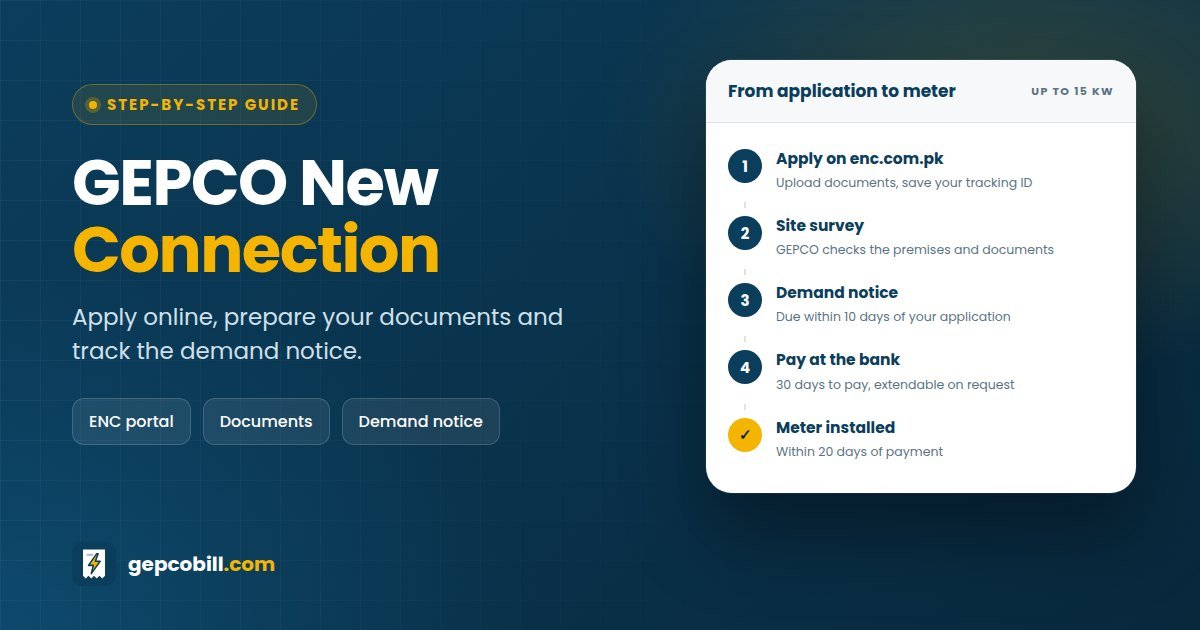
Every GEPCO new connection goes through the same five stages. For a home or shop of up to 15 kW, NEPRA gives GEPCO 30 days in total. That counts only GEPCO’s time, so the days you take to pay the demand notice are not included.
| Stage | What happens | Time limit (up to 15 kW) |
|---|---|---|
| 1. Apply | You submit the form and documents online, then save your tracking ID | — |
| 2. Site survey | GEPCO staff visit the premises, check arrears and collect the paper documents | Within the demand notice period |
| 3. Demand notice | GEPCO issues the bill for connection costs and the security deposit | 10 days after GEPCO receives your application |
| 4. Payment | You pay the demand notice at a designated bank or online | 30 days, plus 30 more on request |
| 5. Installation | GEPCO installs the service cable and meter and starts billing | 20 days after payment |
Who Can Apply for a GEPCO New Connection
Any owner of a premises without a connection can apply. A tenant can also apply, as long as the owner gives written consent and supporting documents.
- Homes: houses, flats and portions, usually on the domestic A-1 tariff.
- Shops and offices: commercial connections on the A-2 tariff.
- Industry and tube wells: industrial and agricultural supply, with extra checks for larger loads.
- Construction sites and events: temporary connections for a fixed period.
However, GEPCO will not connect a premises that already has a connection or unpaid dues. That is why the application includes an affidavit saying there is no existing connection and no default.
Documents Required for a GEPCO New Connection
NEPRA’s Consumer Service Manual lists the documents every DISCO may ask for. Keep clear scans ready before you start, and take the originals along when GEPCO staff visit.
- Proof of ownership of the premises, such as the registry, fard or allotment letter
- Affidavit on Rs 50 non-judicial stamp paper confirming no existing connection and no default
- Attested copies of the CNIC of the applicant and one witness
- Approved building map or site plan, or an NOC from the civic agency (often relaxed for rural homes and shops)
- Wiring test report from the Electric Inspector or an authorised wiring contractor
Extra documents for tenants and companies
Tenants must add the owner’s NOC, together with the owner’s proof of ownership and affidavit. Companies need a certificate of incorporation, a board resolution and a list of directors.
Staff also often ask for a recent bill from the nearest neighbour, because its reference number helps them find the right pole and feeder. It is not a legal requirement, but it speeds up the survey.
How to Apply for a GEPCO New Connection Online
You can apply for a GEPCO new connection online in about 20 minutes once your scans are ready. Here are the steps on the ENC portal.
Menu names on the portal change from time to time, so look for the closest match if a label differs. After you submit, GEPCO staff contact you for the site survey and collect the paper copies during the visit.
Applying at the GEPCO office instead
NEPRA’s rules still let you apply in person at your sub-division office. If you do, ask for an acknowledgement receipt with a serial number or tracking ID, since you will need it at every later step.
Single-Phase or Three-Phase? Choose the Right Load
The load you apply for decides your meter, your monthly fixed charge and even whether you can add solar later. So think about the next few years, not just today.
- Small homes (1–4 kW): a single-phase meter usually covers lights, fans, a fridge and one or two inverter air conditioners.
- 5 kW and above: homes are billed on a peak and off-peak (ToU) meter under the A-1(b) tariff.
- Planning solar: under NEPRA’s Prosumer Regulations 2026, only three-phase consumers can join net billing, and the solar system cannot exceed the sanctioned load. GEPCO itself approves systems of up to 25 kW.
Who approves a GEPCO new connection by load
| Load | Supply voltage | Approving officer |
|---|---|---|
| Up to 15 kW | 230/400 volts | Sub-divisional officer (SDO) |
| Above 15 kW to 70 kW | 230/400 volts | Executive engineer (XEN) |
| Above 70 kW to 500 kW | 230/400 volts | Superintending engineer (SE) |
| Above 500 kW | 11 kV and above | Chief executive officer (CEO) |
Larger loads may also need a transformer. For homes, a shared transformer serves up to 20 kW, while 20–100 kW needs a dedicated transformer or transformer-sharing charges. Shops share a transformer up to 15 kW.
GEPCO Demand Notice: What It Is and How to Pay
The demand notice is GEPCO’s bill for connecting you. It lists the capital cost of the connection and your security deposit. GEPCO issues both together after the survey.
- Capital cost: the service cable, fittings and other material needed to connect your premises.
- Meter: GEPCO supplies the meter at your cost. If it has none in stock, it may ask you to buy one of the approved specification.
- Security deposit: a refundable amount based on your load, returned when the connection is closed and all dues are clear.
You can receive the demand notice by email, post or courier, or download it with your tracking ID. Then pay it at a designated bank branch or online within 30 days.
If you need more time, ask for an extra 30 days. In addition, you can ask to pay in installments without mark-up. Your place in the queue becomes final once you pay.
Security deposit per kW
| Connection type | Urban (Rs per kW) | Rural (Rs per kW) |
|---|---|---|
| Domestic | 1,220 | 610 |
| Commercial | 1,810 | 920 |
These are NEPRA’s approved rates as published by DISCOs. A proposed increase is still pending with NEPRA, so always go by the amount printed on your own demand notice.
How to print or download your GEPCO demand notice
On the ENC portal, open the tracking section, select GEPCO and enter your tracking ID. Once GEPCO issues the demand notice, you will see options to print it or pay it online.
Homes of up to 20 kW and shops of up to 15 kW never pay a cost-escalation charge on top of the demand notice. So the amount you see is the amount you pay.
How Long Does a GEPCO New Connection Take?
NEPRA’s Performance Standards (Distribution) Regulations 2026 set the maximum time for each step. The clock runs from the day GEPCO receives your application, so submit a complete file and keep the acknowledgement.
| Load and supply | Demand notice issued within | Connection after payment within | Total |
|---|---|---|---|
| Up to 15 kW (400 V) | 10 days | 20 days | 30 days |
| 15–70 kW (400 V) | 10 days | 34 days | 44 days |
| 70–500 kW (400 V) | 12 days | 46 days | 58 days |
| 500 kW–7.5 MW (11/33 kV) | 30 days | 76 days | 106 days |
The regulations also set daily compensation for late connections, such as Rs 200 a day for loads up to 15 kW. However, that compensation starts only two years after the rules took effect, which means around August 2028.
How to Track Your GEPCO New Connection
Tracking takes a minute once you have your tracking ID. Open the ENC portal, choose tracking for a new connection, select GEPCO and enter the ID.
The status shows which stage your file has reached, such as arrears verification, site verification, demand notice issued, or payment received. If the status has not moved for longer than the time limits above, call or visit your sub-division office with the tracking ID.
After GEPCO installs the meter, your first bill carries a new 14-digit reference number. Save it, because you will need it for the GEPCO online bill check and every payment.
If Your GEPCO New Connection Is Delayed or Refused
GEPCO cannot simply reject an application. Under NEPRA’s 2026 rules, it must first tell you the grounds in writing and give you reasonable time to fix the problem.
- Visit the sub-division office with your tracking ID and ask for the reason in writing.
- Register a complaint on the 118 helpline or the PITC CCMS portal, and note the complaint number.
- If GEPCO does not resolve it, file a complaint with NEPRA online or through the NEPRA Asaan Approach app, within one year.
Our GEPCO complaint guide explains each channel in detail, including what to attach.
Temporary Connection, Name Change and Extra Load
The same rules cover a few related services. You can apply for most of them on the ENC portal too.
| Service | When you need it | Key rule |
|---|---|---|
| Temporary connection | Construction work, weddings and other events | Up to 6 months for construction (extendable quarterly); up to 2 weeks for events |
| Change of name | After buying a property or on inheritance | Done within 10 days once your documents are complete |
| Change of tariff | When the use of the premises changes | Done within 10 days once requirements are met |
| Extension of load | When you add air conditioners or other heavy appliances | Extra security at current rates; same time limits as a new connection |
If your meter records a demand above your sanctioned load, GEPCO sends a notice with the bill. If you ignore it, GEPCO can extend the load automatically and recover the extra security in 3 to 6 installments.
Tips for a Faster GEPCO New Connection
- Get the wiring test report before you apply, not after
- Make sure the owner’s name on the ownership papers matches the affidavit
- Keep the tracking ID and the demand notice number in your phone
- Pay the demand notice early instead of on the last day
- Ask for three-phase at the start if you plan to install solar
Frequently Asked Questions About GEPCO New Connection
01How can I apply for a GEPCO new connection online?
Go to enc.com.pk, choose the new connection option and select GEPCO with your sub-division. Fill in the form, upload your documents and save the tracking ID. GEPCO staff will then visit for the site survey.
02What documents are needed for a GEPCO new connection?
You need proof of ownership, an affidavit on stamp paper and attested CNIC copies of the applicant and a witness. Add an approved map or NOC where required, plus a wiring test report. Tenants also need the owner’s NOC and papers.
03How long does a GEPCO new connection take?
For loads up to 15 kW, NEPRA allows 10 days to issue the demand notice and 20 days to connect after you pay it, so 30 days in total. Larger loads up to 7.5 MW get between 44 and 106 days.
04What is a GEPCO demand notice?
It is the official bill for your connection costs and security deposit. You must pay it within 30 days at a designated bank or online, and you can ask for 30 more days or for installments.
05How much does a GEPCO new connection cost?
The cost depends on your load, distance from the pole and meter type, so it varies from home to home. It covers the capital cost, the meter and the security deposit. Your demand notice shows the exact total.
06How can I track my GEPCO new connection application?
Open the tracking section of the ENC portal, select GEPCO and enter your tracking ID. The status shows each stage, from site verification to demand notice and installation.
07Can a tenant apply for a GEPCO new connection?
Yes. A tenant can apply with the owner’s written NOC, plus the owner’s ownership proof and affidavit. The connection is still tied to the premises, not to the tenant personally.
08Can I apply at the GEPCO office instead of online?
Yes. NEPRA’s rules allow you to apply in person at your sub-division office. Ask for an acknowledgement receipt with a tracking number, so you can follow up on your application.
09Do I need a three-phase connection for solar net billing?
Under NEPRA’s Prosumer Regulations 2026, only three-phase consumers can apply, and the solar system cannot be larger than the sanctioned load. So request three-phase with enough load if solar is in your plans.
10Is the meter included in the demand notice?
GEPCO supplies the meter at the consumer’s cost, so its price is part of what you pay. If GEPCO has no meters in stock, it may ask you to buy an approved one yourself.
11What can I do if GEPCO refuses my new connection?
Ask for the reason in writing, since GEPCO must give you grounds and time to fix them. If you disagree, complain through 118 and then to NEPRA, attaching your tracking ID and documents.
Start Your GEPCO New Connection Today
A GEPCO new connection is mostly paperwork. With a wiring test report, ownership papers and a signed affidavit ready, the online application takes minutes. After that, NEPRA’s time limits protect you.
Once your meter is live, bookmark our GEPCO online bill check and keep an eye on your GEPCO unit price, so your first bill holds no surprises.
More GEPCO Guides
Disclaimer: GEPCOBill.com is an independent information service. It is not affiliated with Gujranwala Electric Power Company (GEPCO), Power Information Technology Company (PITC), WAPDA or NEPRA. Rules, rates and contact details can change; your printed bill and official notices are final.
Last reviewed: 29 September 2026 by the GEPCOBill editorial team. Checked against NEPRA’s Consumer Service Manual (revised 2025) and the Performance Standards (Distribution) Regulations 2026.