
GEPCO Bill Paid or Not? How to Check Your Payment Status
Wondering whether your GEPCO bill is paid or not? Your payment receipt is the quickest proof, and the official confirmation appears in the payment column of your next bill. This guide shows where to look, which receipt to keep, and what to do if a paid bill still shows as unpaid.
On this page
- Three Ways to Check if Your GEPCO Bill Is Paid or Not
- Is Your GEPCO Bill Paid or Not? Read the Payment Column
- GEPCO Bill Paid or Not: Check the Arrears Line
- When Will Your GEPCO Payment Show?
- GEPCO Bill Paid but Showing as Unpaid? Here Is the Fix
- Paid After the Due Date?
- Keep Your GEPCO Payment Records Tidy
- Frequently Asked Questions: GEPCO Bill Paid or Not
- Know for Sure Whether Your Bill Is Paid
- More GEPCO Guides
Three Ways to Check if Your GEPCO Bill Is Paid or Not
Each method works at a different time, so pick the one that fits where you are in the billing month.
| Method | What you see | When it works |
|---|---|---|
| Your receipt or app confirmation | Amount, date and transaction ID | Right after you pay |
| Payment column of your next bill | The amount GEPCO received against the month | Once the next bill is issued |
| Arrears line of your next bill | Zero arrears if the last bill was paid in full | Once the next bill is issued |
| Sub-division office | The payment in GEPCO’s own records | Any working day |
Is Your GEPCO Bill Paid or Not? Read the Payment Column
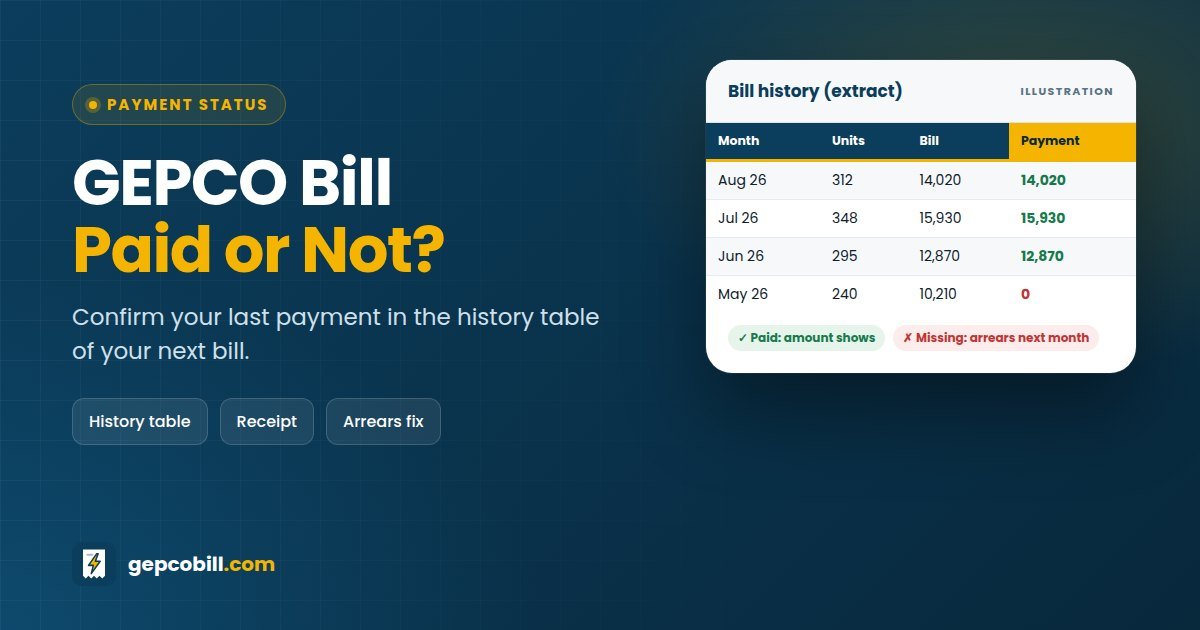
Every GEPCO bill includes a 12-month history table with four columns: MONTH, UNITS, BILL and PAYMENT. When GEPCO receives your money, the amount appears in the payment column on a later bill.
If the two figures match, you paid the bill in full. If the payment is lower, you paid part of it, and the rest usually appears as arrears. If the payment column is empty for that month, GEPCO has not recorded a payment yet.
GEPCO Bill Paid or Not: Check the Arrears Line
The arrears line is the second clue. When you have paid last month’s bill, the arrears on the new bill should be zero, unless older dues are still open.
On the other hand, if last month’s amount appears under arrears, GEPCO has not matched your payment to your account. In that case, keep your receipt ready and follow the steps below.
When Will Your GEPCO Payment Show?
Banks and wallet apps confirm the payment instantly, but GEPCO’s own records can take longer to update. There is no official timeline, and a payment made close to the reading date may appear only on the bill after next.
So the receipt is your real proof in the meantime. Here is what to keep for each payment channel.
| How you paid | Proof to keep | Tip |
|---|---|---|
| Bank counter | The stamped counterfoil of the bill | Check that the stamp shows the date |
| Banking app or internet banking | Screenshot with the transaction ID | Save it in a folder called “GEPCO” |
| JazzCash or Easypaisa | The TID from the app or SMS | Keep the confirmation SMS |
| ATM | The printed slip | Photograph it, as slips fade quickly |
GEPCO Bill Paid but Showing as Unpaid? Here Is the Fix
Do not pay again. A paid bill that shows as unpaid is usually a posting delay or a mismatch, and GEPCO can correct it once you show proof.
- Wait for the next bill and check the payment column once more.
- Confirm the payment date. If you paid after the due date, a late payment surcharge may explain the difference.
- Collect your receipt or transaction ID, plus a copy of the bill you paid.
- Take them to your sub-division office or customer service centre, or to the bank branch where you paid, and ask for the payment to be posted.
- Register a complaint on 118, SMS 8118 or the PITC complaint portal, and note the complaint number.
- If GEPCO still does not fix it, file a NEPRA complaint with your complaint number and receipt.
Paid to the wrong reference number?
Contact your bank or wallet app straight away with the transaction ID, since only they can trace the payment. Then inform your sub-division office, because the money went to another account.
Paid the same bill twice?
Take both receipts to the sub-division office and ask them to adjust the extra amount against your next bill. Keep copies of everything until the credit shows.
Paid After the Due Date?
Paying late does not cancel the payment, but it adds a late payment surcharge. Recent GEPCO bills print two after-due-date amounts: a smaller surcharge for the first few days, and a larger one after that.
If you paid the within-due-date amount after the due date, the unpaid surcharge carries over to the next bill. Therefore, a small arrears figure after a late payment is normal and not an error.
Keep Your GEPCO Payment Records Tidy
- Save every receipt or transaction ID in one phone folder
- Pay a few days before the due date, not on the last day
- Check the payment column when each new bill arrives
- Download a PDF of each bill for your records
A year of saved bills also makes it easy to prove payments when you sell a property or apply for a new connection. Our GEPCO bill history guide explains how to keep and find old bills.
Frequently Asked Questions: GEPCO Bill Paid or Not
01How can I check if my GEPCO bill is paid or not?
Open your next bill and look at the payment column in the 12-month history table. Your payment should appear against the month you paid. Until then, your bank or wallet receipt is your proof.
02Can I check online whether my GEPCO bill is paid or not?
Yes, through the bill itself. Open your latest bill with our checker and read the payment column and the arrears line. The official portal has no separate “paid” button.
03How long does a GEPCO payment take to show?
There is no official timeline. Most payments show on the next bill, but a payment made near the reading date may appear only on the bill after that.
04My GEPCO bill is paid, but the new bill shows arrears. What should I do?
Take your receipt or transaction ID to your sub-division office, customer service centre or the bank branch where you paid, and ask them to post the payment. Also register a complaint on 118.
05Does a paid GEPCO bill show a paid stamp online?
No. The online bill shows the current bill, its history table and any arrears. Your payment appears as an amount in the payment column, not as a stamp.
06I paid after the due date. Is my GEPCO bill paid or not?
Yes, GEPCO counts the payment, but a late payment surcharge applies. If you paid only the within-due-date amount, the surcharge moves to your next bill as arrears.
07What happens if I do not pay my GEPCO bill?
The unpaid amount moves to the next bill as arrears, together with the late payment surcharge. If bills stay unpaid, GEPCO can disconnect the supply, and you must clear the dues before reconnection.
08Can I get a paid GEPCO bill copy for my records?
Yes. Download the next bill as a PDF, since its history table shows your payment. For a stamped copy of an older bill, ask your sub-division office.
Know for Sure Whether Your Bill Is Paid
To confirm whether your GEPCO bill is paid or not, keep the receipt today and check the payment column when the next bill arrives. If the two do not match, the fix takes one visit with your proof.
More GEPCO Guides
Disclaimer: GEPCOBill.com is an independent information service. It is not affiliated with Gujranwala Electric Power Company (GEPCO), Power Information Technology Company (PITC), WAPDA or NEPRA. Rules, rates and contact details can change; your printed bill and official notices are final.
Last reviewed: 29 September 2026 by the GEPCOBill editorial team.